FFSPG

FFSPG

Wednesday, 28 May 2014

Nun Attack Origins: Yuki v1.02 APK


FFSPG
နင္ဂ်ာမေလးက မိစာၦေကာင္ေတြ ရြာေတြကို ဖ်က္ဆီးျပီး လူေတြကိုေခါ ္ေဆာင္ဖမ္းဆီး ခ်ဳပ္ေနွာင္
ထားတာကို နင္ဂ်ာမေလးက အႏၱရယ္ေတြၾကားထဲကေနကယ္တင္ရမွာပါ ....

စိတ္ဝင္စားဖို ့ေကာင္းသလို ၊ ေဆာ့ရတာလည္း ဂြတ္ပါတယ္ခင္ဗ် :D

An ancient portal has opened, releasing a force that razed the village and spirited the orphans away. It’s up to Yuki, Sister of Silence, mistress of stealth and Nun-jutsu, to eradicate this unrelenting evil. In this epic quest to save the missing orphans and avenge the village, peek into Yuki’s past as she uses her deadly ninja war fans to kick some serious butt.
In a world where the wicked know no rest, you must hunt down the forces of evil and save the kidnapped orphans before God knows what horrible fate befalls them!
In this tactical action-puzzle, discover Yuki’s secret art of Nun-jutsu: slide, slice and dice! Through an intuitive touch-screen gameplay, strike at enemies from the shadows, slay - Deep Ones, and rebuild the village, all on your quest to save the missing orphans.


FEATURES:
- 90 different levels
- 216 orphans to rescue (please save them all!)
- A village to rebuild
- A fun strategic one-touch game
- Action-packed, non-stop fun!
Nun Attack Origins treats us to a glimpse at the lives of our badass Nuns before they joined the Sisterhood.
Can you master the art of Nun-justsu and vanquish evil? Think you’ve got what it takes to answer the holy call? Then try Yuki’s Silent Quest before it’s too late for these poor orphans!
Facebook.com/NunAttack


Updated
Size
36M
Installs
1,000 - 5,000
Current Version
1.02
Requires Android
2.2 and up

https://play.google.com/store/apps/details?id=com.frimastudio.yuki&hl=en


DOWNLOAD LINK;


PCLOUD  OR  COPY


INSTALL APK,
PLAY GAME!


THANK FOR ALL
YM7


Tuesday, 27 May 2014

Note2 N7100 အတြက္ S5 future မ်ားပါဝင္တဲ့ Electron-team DN3 v5+ rom


FFSPG

Electron-team DN3 v5+ rom ေလးျဖစ္ပါတယ္။ S5 Future ေတြပါဝင္ပါတယ္ ။
သံုးရတာလြယ္ကူေပါ့ပါးျပီး ၊ အားလံုးအဆင္ေျပလိုျ့ပန္တင္ေပးလိုက္ပါတယ္ခင္ဗ်ာ :)
သူရဲ့ Main future ေတြကိုေအာက္မွာ ၾကည့္ရွဳ နိုင္ပါတယ္ ။
FULL rom & LITE rom နွစ္မ်ိဳးပါ ။
Full rom is 1.9GB zip vs Lite rom is 1.6GB zip ျဖစ္ပါတယ္။

Rom နွစ္မ်ိဳးလံုးမွာ Note 3 and S5 features ေတြျပီး ၊ Lite rom မွာေတာ့ s5 apps အနည္းငယ္သာ
ပါဝင္မွာပါ။ 
Lite rom မွာ Gmail, Maps, Youtube, Evernote and most Samsung apps because you can download them from Google Play မပါဝင္ပါဘူး ၊ မိမိနွစ္သက္ ျဖည့္သြင္းေပးရမွာပါ ။
FULL rom မွာ အျပည့္စံုပါဝင္ျပီးသားျဖစ္ပါတယ္ ( က်ေနာ္လည္း full rom တင္ထားတာပါ )


သူကိုတင္ဖို ့ မိမိရဲ့ဖုန္းမွာ 4.4.2 Stock rom , ROOT , CWM ရွိထားရပါမယ္ ။


က်ေနာ္ကိုယ္တိုင္တင္ထားတဲ့ပံုေလးေတြပါ ....


DN3 V5+ for Galaxy Note II


MAIN FEATURES:

  • - Galaxy S5 Contacts app
  • - Galaxy S5 Phone app Feature S5 in coming call popup notification style
  • - Call Recording button during calls
  • - Galaxy S5 Messaging app Feature S5 in coming message notification style (Thanks to VN Team for SecMms mod)
  • - Galaxy S5 Drive Link
  • - Galaxy S5 Sbrowser
  • - Galaxy S5 Music Player
  • - Galaxy S5 Gallery New lockscreen effect - Blind Effect
  • - Air Command
  • - Smart Scroll
  • - Smart Pause
  • - Signature Lock
  • - Note 3 Multiwindow Style
  • - Writting Buddy (Direct Pen Input)
  • - One Hand Operation in All Screens
  • - Note 3 Icons
  • - Note 3 Launcher
  • - Note 3 MyFiles
  • - Note 3 SNote
  • - Note 3 S FInder
  • - Note 3 ScrapBook
  • - Note 3 SketchBook
  • - Note 3 Story Album
  • - Note 3 Quick Glance
  • - Galaxy S5 Toolbox feature
  • - Galaxy S5 Power Saving Mode
  • - Galaxy S5 Ultra Power Saving Mode
  • - Galaxy S5 Launcher and Magazine app
  • - Galaxy S5 theme chooser
  • - Galaxy S5 Wallpapers
  • - Note 3 incoming call notification pop-up
  • - Note 3 Popup menu in many note 3 apps.
  • - Other note 3 apps like contacts,msg etc.
  • - Pen Window Manager from @xperiacle
  • - Possible to use the same app in both multiwindows
  • - New unlock effects from S5 (we also were the first ones to port it :-) )
  • - Note 3 and Galaxy S5 Settings with search feature. You can choose between both of them
  • - DN3 Exclusive feature called AnyApp allows fully customisable air command. It let you use any app you choose in Air Command. Instead of S Finder you can use any other app from air command right now)
  • - Many more things that we might forget... see it yourself today.

CHANGELOG:

1) Aroma Roms (Full & Lite version)
2) Optional S5 apps & themes (thanks to avivalder for his contribution to the video player)
3) Menu Key maps to recents app & long press home button maps to google search (optional)
4) Added themes option in settings
5) Added dock settings option in accessories menu
6) Added previous stock N2 motion gestures in settings/motion
7) Phone/in call - now use Action Memo instead of S5 memo
8) Fixed some bugs on SystemUI notifications
10) Fixed some bugs on lockscreen
11) Added support up to 9 apps in Toolbox
12) Disabled increasing ringtone
13) Add support for semi transparent statusbar in most samsung stock applications
14) Fixed samsung security remote control
15) Ultra Power Saving Mode now with 3x3 grid
16) Custom DN3 kernel with SE Linux disabled and aircrack support

CURRENT BUGS:

1) Effects of Galaxy S5 music player still don´t work
2) Wifi Direct doesn't work properly. The first time you try it works without problem, but after that every time you want to use it you have to turn it off, re-enable and use it again
3) Some pop-ups like the one related to low battery don't have the divider line between OK and Cancel fi you flashed the rom selection S5 UI


Download Links

Full rom

Pcloud link: part1 / part2 / part3 / part4 / part5 /
                     part6 / part7 / part8  / part9 / part10 

Mega link

Firedrive link


Lite rom

Mega  (OR)   Firedrive
DN3_v5+_LITE.zip ကို ဖိုင္ Size ျပည့္လားစစ္ေပးပါ :)

သူကိုတင္ဖို ့ မိမိရဲ့ဖုန္းမွာ 4.4.2 Stock rom , ROOT , CWM ရွိထားရပါမယ္

ဖုန္း SD card ထဲသို ့ DN3_v5+_LITE.zip ကိုထည့္ေပးပါ ။

ပါဝါပိတ္ ျပီး CWM ဝင္ေပးပါ ။ ( power + home + vol up နွင့္စံုနိုပ္ထားပါ
ဆန္ေဆာင္း လိုဂိုတက္လာရင္ power လြတ္က်န္နိုပ္ထားပါ
CWM ထဲေရာက္သြားပါမည္ )

1/ wipe cache partition

2/ wipe data / factory reset ( install new rom နိုပ္ပါ )

3/ advanced ( wipe Dalvik Cache နိုပ္ပါ )

4/ install zip ကိုဝင္လိုက္ျပီး DN3_v5+_LITE.zip ထည့္ထားေသာ sd ထဲဝင္ျပီး install ေပးပါ။

သူအဆင့္တိုင္း ေျဖးေျဖးလုပ္ေဆာင္သြားပါ ( S5 music player ေနရာေရာက္ရင္ note2 music player ကို
ေရြးခ်ယ္လိုက္ပါ ) ေနာက္ဆံုးမွာ reboot နဲ ့ျပန္ထြက္လိုက္ပါ ။
( အကယ္၍ ေနာက္ဆံုးမွာ ရပ္ေနလ်င္ ဘထရီျဖုတ္ျပန္တပ္ျပီး ပါဝါျပန္ဖြင့္လိုက္ပါ အဆင္ေျပပါတယ္ )


ပါဝါျပန္တက္လာရန္ S5 boot ေလးနဲ ့လွပစြာျပန္တက္လာမွာပါ ( ၅မိနစ္ေလာက္ ေစာင့္ေပးပါ )

Setting ထဲမွာ အသံုးျပဳ လိုသည္မ်ားကို ျပန္ဖြင့္ေပးပါ ။
Setting / spen / Air command ကိုဖြင့္ေပးပါ :)

home launcher အေပါ ္ညာေထာင့္က အစက္သံုးစက္ setting ထဲမွာ  GALAXY Essentials ထဲမွာ
မိမိနွစ္သက္ samsung app မ်ားကို ေဒါင္းယူနိုင္ပါတယ္ ၊ အပ္ဒိပ္မ်ားျပဳလုပ္နိုင္ပါတယ္ ခင္ဗ်ာ :)

Pullup from FakeJap ကေတာ့ note3 မွာ မဂၢဇင္းကိုေအာက္ေျခကဆြဲတင္သလို သူထဲမွာ ၾကိဳက္တဲ့
app ကိုေရြးျပီးဆြဲတင္နိုင္ပါတယ္ ။ က်ေနာ္ကေတာ့ ေဖ့ဘုတ္ကိုသံုးလိုက္ပါတယ္ :D

Setting / lock screen / unlock effect ခ်ိန္းျပီး ဖုန္းေလာ့စခရင္ စတိုင္ေျပာင္းသံုးနိုင္ပါတယ္ ။

Setting / Toolbox ထဲမွာ ၾကိဳက္တဲ့ app ကို အလံုးေလးထဲထည့္ထားျပီး လြယ္သူစြာ သံုးနိုင္ပါတယ္ ။


သူရဲ့ ဆိုက္မွာ သြားေရာက္ေလ့လာနိုင္ပါတယ္
http://electron-team.com/ROM/v5plus/


THANK FOR ALL
YM7


First Eleven Sports Journal အတြဲ ၁၄ အမွတ္ ၅၁


FFSPG

ေမလ ၂၇ ရက္ေန႔ထုတ္ First Eleven Sports Journal အတြဲ ၁၄ အမွတ္ ၅၁ အား Download ရယူႏုိင္ပါသည္။


http://www.mediafire.com/download/5xhrb3afl5cx6y2/First+Eleven+Vol14+No51.pdf

http://www.mediafire.com/download/mz8eaq23x6r0w8v/First+Eleven+Vol14+No51.pdf


THANK FOR ALL
YM7


Monday, 26 May 2014

Good Health ( Issue -488 )


FFSPG


Download Link 

 mediafire


THANK FOR ALL
YM7


Android Settings အေၾကာင္း ေလ႔လာျခင္း


FFSPG

Service သမားတစ္ေယာက္ဟာ ဖုန္းတစ္လုံးကုိ ေလ႔လာမယ္ဆုိရင္ သူ႕ရဲ႕ settings ပိုင္းကို အရင္ေလ႔လာတာ အေကာင္းဆုံးဘ ဲအားလုံးက သူရဲ႕settings ထဲမွာဘဲအကုန္ရွိပါတယ္
တစ္ခုခ်င္း ရွင္းျပပါမယ္ အခု ဒီဟာကေလးက ေတာ႔ version ၄.၀ အထက္ settings ေလးပါ
settings ပိုင္းဆိုင္ရာက version အလိုက္ ကြဲလြဲပါတယ္ ဒါေပမဲ႕ တစ္ခုနဲ႕ တစ္ခုက ပုံစံတူတူပါဘဲ
-
WIRELESS & NETWORKS မွာဆိုရင္ ဒီေကာင္ေတြပါပါတယ္
Wi-Fi >> Network လိုင္း အမ်ိဳးမ်ိဳး ခ်ိတ္ဆက္ရန္
Bluetooth >> Bluetooth ခ်ိတ္ဆက္ျခင္း
Data usage >> Mobile Data
More >>Network ပိုင္းဆက္သြယ္ရာ လုပ္ေဆာင္ခ်က္ အထိပါပါတယ္
DEVICE မွာဆုိရင္ ဒီေကာင္ေတြ ပါပါတယ္
Sound >> အသံပိုင္းဆိုင္ရာ လုပ္ေဆာင္ခ်က္
Display >> ျမင္ကြင္းပိုင္းဆိုင္ရာ လုပ္ေဆာင္ခ်က္
Storage >> မန္မိုရီ ပမာဏ
Battery >> ဘက္ထရီ ပိုင္းဆိုင္ရာ လုပ္ေဆာင္ခ်က္
Apps >> application ပိုင္းဆိုင္ရာ လုပ္ေဆာင္ခ်က္ အထိပါ၀င္ပါတယ္
PERSONAL မွာဆုိရင္
Call >> ဖုန္း အ၀င္အထြက္ ဆိုင္ရာ လုပ္ေဆာင္ခ်က္
Message >> မက္ေဆ႔ပိုင္းဆိုင္ရာ လုပ္ေဆာင္ခ်က္
Accounts & sync >> Account ပိုင္းဆိုင္ရာ လုပ္ေဆာင္ခ်က္
Location service >> GPS ဆိုင္ရာ လုပ္ေဆာင္ခ်က္
Security >> ကိုယ္ပိုင္ လုပ္ေဆာင္ခ်က္
Language & input >> ဘာသာစကား ႏွင္႔ စာရိုက္ကြက္
Backup & reset >>ကိုယ္ပိုင္ လုပ္ေဆာင္ခ်က္ အထိ ပါ၀င္ပါတယ္
-
-
SYSTEM မွာဆုိရင္ ေတာ႔
Date & time >> အခ်ိန္ ႏွင္႔ ေန႔ရက္ အတြက္
Accessibility >> အသုံး၀င္ ပိုင္းဆိုင္ရာ လုပ္ေဆာင္ခ်က္
Developer options >> အသုံး၀င္ ပိုင္းဆိုင္ရာ လုပ္ေဆာင္ခ်က္
Fast boot >> ပါ၀ါ ပုိင္းဆိုင္ရာ လုပ္ေဆာင္ခ်က္
About phone >> ဖုန္းအခ်က္အလက္ မွတ္တမ္း အထိပါ၀င္ပါတယ္….
Wi-Fi အေၾကာင္းကိုေလ႔လာျခင္းwifi ဆိုတာကေတာ႔ network ကြန္ယက္ခ်ိတ္ဆက္ျခင္း လုိ႕ အမည္ရပါတယ္
wifi မွာက ႏွစ္မ်ိဴးရွိပါတယ္ Free ရတဲ႕ wifi နဲ႕ security ကို ထိန္းခ်ဳပ္ထားတဲ႕ wifi ဆိုျပီး ရွိပါတယ္ ..free ရတဲ႕ wifi ဆိုရင္
အလြယ္တကူ wifi ခ်ိတ္ဆက္ ႏိုင္ျပီးေတာ႔ security ထိန္းခ်ဳပ္ထားတဲ႕ wifi ဆိုရင္ ေတာ႔ အလြယ္တကူ သုံးလို႕မရပါဘူး
သူရဲ႕ password ကုိ သိမွာတာ သုံးလို႕ရပါလိမ္႔မယ္ free ရတဲ႕ wifi ရွိတဲ႕ေနရာကေတာ႔ ေကာ္ဖီ ဆိုင္ေတြ အေအးဆိုင္ေတြမွာ တစ္ခါတစ္ေလ ေပးတတ္ပါတယ္ security ထိန္းခ်ဳပ္ထားတဲ႕ wifi ဆိုရင္ေတာ႔ wifi ကုိ ၀င္လိုက္တာနဲ႕ ေဘးနားမွာ ေသာ႔ပုံစံေလး ေပၚေနတတ္ပါ
တယ္ wifi ကုိ ဘာလုိ႕ ခ်ိတ္ရလဲဆုိရင္ အင္တာနက္ သုံးဖို႕ အတြက္ ခ်ိတ္ဆက္ျခင္း ျဖစ္ပါတယ္
Bluetooth အေၾကာင္း ေလ႔လာျခင္း
Bluetooth ဆိုတာကေတာ႔ ဖုန္းတစ္လုံးနဲ႕ တစ္လုံး data ေတြ ရွယ္တဲ႕ အခါမွာ သုံးျခင္းႏွင္႔ Bluetooth Earphone ခ်ိတ္ဆက္ျခင္း
အတြက္ သုံးတဲ႔ အခါမွာ အသုံး၀င္ပါတယ္ Bluetooth system
ပါေသာ ဖုန္းအခ်င္းခ်င္း သီခ်င္း၊ဗီဒီယုိ၊ဖိုင္၊ဂိမ္းေတြ အျခားျခားေသာ ဖုိင္ေတြ ရွယ္တဲ႕ အခါမွာ အသုံး
ျပဳၾကပါတယ္ Bluetooth ကို ခ်ိတ္ဆက္မယ္ဆိုရင္ bluetooth ကုိ on ျပီးေတာ႔ တစ္ခုနဲ႕ တစ္ခု ခ်ိတ္ဆက္ရပါမယ္ တကယ္လို႕
မသိေသးပါက scan for device ကုိ ႏွိပ္ေပးလိုက္ပါ တေအာင္႔ေလာက္ ၾကာရင္ ဖုန္း အခ်င္းအခ်င္း သိသြားပါလိ္မ္႔မယ္
သိသြားရင္ အခ်က္ျပ စာတမ္းေလ တတ္လာပါလိမ္႔မယ္ pair ဆိုတဲ႕ စာေလးကို ႏွိပ္လုိက္ပါ version အနိမ္႔ဖုန္းေတြမွာ
တစ္ခါတစ္ေလpassword ေတာင္းတတ္ပါတယ္ အဲဒီအခါက်ရင္ 0000 ဒါမွ မဟုတ္ 1234 ကို ႏွိပ္လုိ္က္ပါ အဲဒီအခါ
သိသြားျပီး မိမိတို႕လိုခ်င္တဲ႕ ဖုိင္ေတြ ရွယ္လို႕ရပါျပီ
-
-
Data usage ကေတာ႔ mobile data limit ေတြကို ခ်ိန္ေပးတဲ႕ အပိုင္းပါ
ဒါကေတာ႔ မလိုပါဘူး More ဆိုတဲ႕ အပိုင္းကုိ ၀င္လို္က္တာနဲ႕ Wireless & networks ဆိုတဲ႕ အပိုင္းကို ေတြ႕ရပါလိမ္႔မယ္
ဒီအပိုင္းမွာ ပါေတြ ပါ၀င္လဲ ဆိုရင္ Airplane mode,VPN,Tethering & portable hostpot,Mobile network အပိုင္းပါ
Airplane mode ဆိုတာကေတာ႔ ေလယာဥ္ပ်ံလို႕ ဆိုရမွာေပါ႔
သူရဲ႕ ဆုိလိုရင္းကဘာလဲဆိုေတာ႔ ေလယာဥ္ေပၚ ေရာက္ရင္ အကုန္လုံးဆက္သြယ္မွဳ ဧရိယာ ျပင္ပ ေရာက္ကုန္ေရာေလ
အဲဒီအဓိပၸါယ္ပါဘဲ အဲဒီေကာင္ေလးကို off လုပ္လိုက္တာနဲ႕ မိမိရဲ႕ အေပၚဘားတန္းမွာ ေလယာဥ္ပ်ံေလး ေပၚေနပါလိမ္႔မယ္
ဒီေကာင္းေလးကို ပိတ္လို္က္ရင္ ဖုန္းလိုင္းေလး ေပ်ာက္သြားပါလိမ္႔မယ္ ဒါေပမဲ႕ ဒီျပင္လုပ္ေဆာင္ခ်က္ေတြ အကုန္ လုပ္ေဆာင္လုိ႔ရပါတယ္
ဒီေကာင္က ဖုန္းလိုင္းတစ္လို္င္းထဲကိုသာ လုပ္ေဆာင္ေပးတာပါ သီခ်င္းေတြ ဗီဒီယိုေတြ ဂိမ္းေတြ ေဆာ႔လို႔ရပါလိ္မ္႔မယ္
power off ထား စရာမလိုေတာ႔ပါဘူး
VPN ဆိုတာကေတာ႔ ျမန္မာႏိုင္ငံမွာ သိပ္မသုံးၾကပါဘူး ဘာလိုလဲဆိုေတာ႔ ဒီေကာင္ကို သိပ္မရွင္းျပေတာ႔ပါဘူး
Tethering & portable hostpot ကေတာ႔ ကိုယ္႔ဆီက အင္တာနက္ကို sharing လုပ္ေပးတဲ႕ သေဘာပါ
ဆိုလိုရင္းကေတာ႔ အင္တာနက္ကုိ မွ်ေ၀ သုံးစြဲျခင္းေပါ႔ Mobile networks ဆိုတာကေတာ႔
ကိုယ္႔ဖုန္းတစ္လုံး အင္တာနက္ ေလွ်ာက္ျပီးသြားရင္
ဒီထဲမွာ သြားျပင္ရတဲ႕ အပုိင္းကုိ ဒီအပိုင္းကုိ internet settings ခ်ိတ္နည္း အပိုင္း က်မွ ရွင္းျပေပးပါမယ္
Sound ဆိုတာကေတာ႔ အသံပိုင္းဆိုင္ရာကို ေလ႔လာျခင္း ျဖစ္ပါတယ္ အဲထဲကို ၀င္လုိ္က္တာနဲ႕ သူနဲ႕
သက္ဆုိင္တဲ႕ folder ေတြ က်လာပါလိမ္႔မယ္ volume ဆိုတဲ႕အပိုင္းမွာ ေတာ႔ music,video,games,
other media,Ringtone & notifications , Alarms ေတြပါပါလိမ္႔မယ္
Silent mode ဆိုတာကေတာ႔ ဖုန္းလာရင္ vibrate တုန္ခါတာရယ္ ဖုန္းလာရင္ ဘာအသံမွ မၾကားခ်င္တာရယ္ ထားလို႕ရပါတယ္

phone ringtone မွာ ဆုိရင္ေတာ႕ ဖုန္းလာရင္ ျမည္တဲ႕ အသံ
အမ်ိဳးမ်ိဳး ထားလို႕ရပါတယ္ သူထဲ႔က ပါတဲ႕ ringtone အျပင္ အျပင္က ထည္႔ထားတဲ႕ ringtone ေတြပါ ထည္႔ထားလို႕ရပါတယ္
Default notification ဆိုတာကေတာ႔ အျခားျခားေသာ ringtone
အသံေတြ ထားလို႕ရပါတယ္ အမ်ားစုကေတာ႔ မက္ေဆ႔ကို default notification မွာ ringtone အသံ လာေျပာင္းတာ မ်ားပါတယ္
Vibrate & ring ကေတာ႔ ဖုန္းလာရင္ သီခ်င္းေကာ vibrate တုန္ခါသံပါ
ၾကားရတဲ႔ အပိုင္းပါ DTS mode ဆိုတာကေတာ႔ သူ႔အတုိင္းဘဲ ထားလုိက္ပါ အသုံးမလိုပါ Dial pad touch tones ဆိုတာကေတာ႔
ဖုန္းေခၚတဲ႕အခါ ကီးပတ္ေလးေတြကို ႏွိပ္ုလို္က္တဲ႕ အခါ မည္တဲ႕
အသံပါအသုံးမလိုပါကဒီေနရာကေနလုပ္ေဆာင္လုိ႔ရပါတယ္Touchsoundဆိုတာကေတာ႔touchႏွိပ္
လိုက္ရင္ ျမည္တဲ႕ အသံပါ Screen lock sound ဆုိတာကေတာ႔ ဖုန္းမ်က္ႏွာျပင္ကို ပိတ္လုိက္ရင္ ျမည္တဲ႕ အသံပါ
Vibrate on touch ဆိုတာကေတာ႔ touch ႏွိပ္လိုက္ရင္ vibrate တုန္ခါတဲ႕ အသံပါ
-
-
Display ဆိုတာကေတာ႔ ျမင္ကြင္းပိုင္းဆိုင္ရာကုိ ေျပာတာပါ Display ကုိ ၀င္လိုက္တဲ႕ အခါ
Brightness,Wallpaper,Auto-rotate screen,Sleep,Font size,Notification settings ဆိုတဲ႕ အပိုင္းေလးေတြ ေတြ႔ရပါလိမ္႔မယ္
Brightness ဆိုတာကေတာ႔ အလင္း အေမွာင္ကို ေျပာတာပါ ခင္ဗ်ာ သူကေတာ႔ ျမင္ကြင္းပိုင္းရဲ႕ အလင္း အေမွာင္ကို ခ်ိန္ရတဲ႕ အပိုင္းပါ ..
-
Wallpaper ကေတာ႔ ကြ်န္ေတာ္တုိ႕ ဖုန္းစစဖြင္႔ခ်င္း ျမင္ရတဲ႕ မ်က္ႏွာျပင္မွာ ေပၚတဲ႕ ရုပ္ကို ေျပာတာပါ သူကေတာ႔ ပုံစံအမ်ိဳးမ်ိဳးနဲ႕ ပုံေတြကို လိုခ်င္သလို ေျပာင္းလို႕ရပါတယ္ ဓာတ္ပုံ အရွင္ေတြပါ ထားလို႕ရပါတယ္
Auto-rotate screen မွာ အမွန္ျခစ္ေလး တပ္ထားပါက သူ႔ပါရင္ဖုန္းကို တစ္ျခမ္းေစာင္းလိုက္တာနဲ႕ အလိုလို လွည္႔ပတ္ေပးပါတယ္
sleep ကေတာ႔ ကိုယ္႔ဖုနး္ကို အသုံးမျပဳခ်င္တဲ႕အခါမွာ အခ်ိန္နဲ႕မွတ္ျပီး auto ပိတ္ေပးပါတယ္ လိုသလို ခ်ိန္ေပးလို႔ ရပါတယ္ Font size ကေတာ႔ မိမိျမင္ေနတဲ႕စလုံးေတြရဲ႕ အရြယ္အစားကို
ေျပာတာပါခင္ဗ်ာ ေသးလို႕ရတယ္ ၾကီးလို႕ရပါတယ္ Notification settings ကေတာ႔ ဘားတန္းကိုေျပာတာပါခင္ဗ်ာ
ဒီေကာင္ေလးကို အမွန္ျခစ္ ျဖဳတ္ထားရင္ မိမိရဲ႕ အေပၚဘားတန္းမွာ သူနဲ႔ သက္ဆုိင္တဲ႕ settings ေတြ ေပၚမွာ မဟုတ္ပါဘူး
တကယ္လို႕ ေပၚခ်င္ရင္ အမွန္ျခစ္ေလး တတ္ထားလိုက္ပါ ဒီတစ္ခ်က္ေတာ႔ အရး ၾကီးပါတယ္ ဘာျဖစ္လို႕လဲဆိုေတာ႔
တစ္ခ်ိဳ႕ customer ေတြက တစ္ခုခုမွား ႏွိပ္မိရင္ အေပၚဘားတန္းေလး ေပ်ာက္သြားတတ္ပါတယ္ အဲဒီအခါက်ရင္ အဲေကာင္ေလးကို
အမွန္ျခစ္ထည္႔ေပးလိုက္ပါ
Storage ဆိုတာကေတာ႔ မန္မိုရီ မွတ္ဥာဏ္ကုိ ဆုိလိုတာပါ သူထဲက ၀င္လုိ္က္တာနဲ႕ software upgrade ကိုေတြ႔ပါလိိမ္႔မယ္
အဲဒီေကာင္က ဘယ္အခါေတြမွာ အသုံး၀င္လဲဆိုရင္ တစ္ခ်ိဳ႕ huawei ဖုန္းေတြ ေလာက္မွာဘဲ အသုံး၀င္ပါတယ္ ဖန္း၀ဲဗားရွင္း ျမွင္႔တင္တဲ႕အခါ
update လုပ္တဲ႕ အခါေလာက္မွာ အသံုး၀င္ပါတယ္ Default storage location ကေတာ႔ ဖုန္းမန္မိုရီ ေရႊးေပးရတာပါ အဲထဲကို ၀င္လုိက္တာနဲ႕
Internal Storage နဲ႕ SD card ဆိုတာ ရွိပါတယ္ SD card ထည္႕ထားရင္ SD card ကို ေရႊးေပးထားလိုက္ပါ ဘာျဖစ္လို႕လဲဆုိေတာ႔
တစ္ခ်ိဳ႕ ဗားရွင္းအျမွင္႔ 4.1.1 ကေနစျပီး ေတာ႔ တစ္ခ်ဳိ႕ဖုန္းေတြမွာ SD card ကို မေရႊးေပးထားတဲ႕ အတြက္ သြင္းသမွ် software ေတြက
မန္မိုရီ ကဒ္ထဲကုိဘဲ ၀င္ေနလို႕ပါ ဘယ္လိုလုပ္လုပ္ SD card ကုိ သိမွာ မဟုတ္ပါဘူး အဲဒီအခါက်ရင္ Default storage location>>SD card
ကုိေ ရႊးေပးထားလိုက္ပါ ေအာက္က အပိုင္းေတြကေတာ႔ ဘယ္ application က ဘယ္ေလာက္သုံးထားသလဲဆိုတာ ျပတဲ႕ အပိုင္းေတြပါ
ေလ႔လာ ၾကည္႔ပါ
-
-
Battery အပိုင္းကို ၀င္လိုက္တာနဲ႕ ဘက္ထရီရဲ႕ စြမ္းအင္ရာခုိင္ႏွဳန္း ကို ေဖာ္ျပတဲ႕အရာရယ္ ေနာက္တစ္ခု ဘယ္အပိုင္းက ဘယ္လို
သုံးထားသလဲ ဆိုတဲ႕ အပိုင္းရယ္ပါ ဒီေကာင္းေလးကေတာ႔ သိေအာင္လို႔ပါ အသုံးမလိုပါ
Apps ထဲကုိ ၀င္လုိက္တာနဲ႕ ကိုယ္႔သြင္းထားတဲ႕ application ေတြကုိ ေတြရပါလိမ္႔မယ္ မိမိတို႕ သြင္းထားတဲ႔ app ေတြကို
မၾကိဳက္တဲ႔အခါ ဒီမွာ တစ္ခုခ်င္းလာဖ်က္လို႔လဲ ရပါတယ္ ျပီးေတာ႔ SD card ထည္႔ထားရင္ ဖုန္းမန္မိုရီထဲ႔က app ေတြကိုလည္း
ဒီမွာ လာေရႊ႕လို႔ရပါတယ္ ေရႊ႕ခ်င္တယ္ ဆိုရင္ေတာ႔ version အနိမ္႔ ေတြမွာ လြယ္လြယ္ ကူကူ ေရႊ႕လို႔ရျပီးေတာ႔ version အျမွင္႔ေတြမွာ
ဆိုရင္ settings>>storage >>Default storage location>>sd card ကိုေရႊးေပးထားလိုက္ပါ အဲဒီအခါက်ရင္ လြယ္လြယ္ကူကူ ေရႊ႕လုိ႕ရပါျပီ
Call အပိုင္းမွာ ဆုိရင္ သူနဲ႕ သက္္ဆိုင္တဲ႔အပိုင္းေတြပါပါတယ္ voicemail service တို႔ voicemail settings တို႕ေတြဟာ
ျမန္မာႏိုင္ငံ အေနနဲ႔ အသုံးမ၀င္ပါဘူး ေက်ာ္ခဲ႔ပါ ေနာက္တစ္ခု Message ဆိုတဲ႕အပိုင္းမွာေတာ႔
Message settings ဆိုတဲ႕ သက္ဆုိင္တဲ႕အပိုင္းေတြပါပါတယ္ သူအမွန္ျခစ္ထားေတြထားလိုက္ပါ
တစ္ခ်ိဳ႕ဖုန္းေတြမွာ မက္ေဆ႔ အ၀င္ရျပီးေတာ႔ အထြက္မရတဲ႕ အခါေတြ ရွိပါတယ္ အဲဒီအခါက်ရင္ ဒီေနရာမွာ လာျပင္ေပးရပါတယ္
message center ပါတဲ႔ ဖုန္းေတြမွာဘဲ ျပင္ေပးလို႕ရပါတယ္ message>>message center>>+9595930003 ရယ္ +9595930014 ရယ္
ကိုယ္႔နဲ႕ သင္႔ေတာ္တဲ႔အရာထည္႔ျပီးေတာ႔ လုပ္ၾကည္႔ပါ တစ္ခုမဟုတ္ တစ္ခုအဆင္ေျပပါတယ္ version အျမွင္႔ဖုန္းေတြမွာ
က်ေတာ႔ တစ္ခ်ိဳ႕ဟာေတြ မပါတတ္ပါဘူး ဒါေပမဲ႕ တစ္ခါတစ္ေလ သူက ေအာ္တို ခ်ိန္ေပးတတ္ပါတယ္ တစ္ခ်ိဳ႕ ဖုန္းေတြမွာ
မက္ေဆ႔ အ၀င္ အထြက္ေတြက တစ္ခါတစ္ေလ ??? ?? အဲလိုေတြ ေပၚေနတတ္ပါတယ္ အဲဒီအခါက်ရင္
Message setting>>input method>>auto ကုိေရႊးေပးပါ ျပီးရင္ ဖုန္းကို restart ခ် ဒါမွမဟုတ္ ပါ၀ါပိတ္ျပီး ျပန္ဖြင္႔ပါ
အဲက်ရင္ မက္ေဆ႔ ျပန္ပို႔ၾကည္႕ပါ အဆင္ေျပပါလိမ္႔မယ္ key pad ဖုန္းေတြမွာလည္း ဒီလိုဘဲ ျပင္ေပးရင္ ရပါတယ္
-
-
Accounts & sync ဆိုတာကေတာ႔ အင္တာနက္သုံးရင္ မိမိရဲ႕ Facebook account,gmail account,yahoo mail account
တစ္ျခားျခားေသာ အေကာင္႔ေတြကို ဒီမွာလာထည္႕ထားလို႕ရပါတယ္ gmail accont ဖြင္႔ခ်င္ရင္ ဖုန္းထဲက လာဖြင္႔ရင္ ပုိအဆင္ေျပပါတယ္
ဒီေနရာကေန လာဖြင္႔ရင္ ပိုအဆင္ေျပပါတယ္ Location services ကေတာ႔ GPS ကုိ ေျပာတာပါခင္ဗ်ာ
ဒါေပမဲ႕ သူကို သုံးရင္ GPS ပါတဲ႕ app ေတြ ခံသုံးမွဘဲ အဆင္ေျပပါလိမ္႔မယ္ ဥပမာ Gother Myanmar ဆုိတဲ႔ application ခံသုံးရင္ေတာ႔ ပိုအဆင္ေျပပါလိမ္႔မယ္
-
Security ဆိုတဲ႕ အထဲကို ၀င္လိုက္တာနဲ႕ အေပၚဆုံးတန္းမွာ Screen lock ဆိုတဲ႕ အရာေလး ေတြ႕ပါလိမ္႔မယ္ ဒီေကာင္ေလးက ဘာလဲဆိုေတာ႔ ဖုန္းစစဖြင္႔လိုက္တာနဲက ဖုန္းမ်က္ႏွာျပင္ကို lock ခ်ထားတာပါ သူကေတာ႔ ေတာ္ေတာ္မ်ားမ်ား အသုံး၀င္ပါတယ္ နံပတ္ေတြ ဂဏန္းေတြ နဲ႕ဖုန္းရဲ႕ မ်က္နွာျပင္ကုိ lock ခ်ထားတဲ႕ အရာေလးပါ ကိုယ္႔မႏွစ္သက္လို႕ ျပန္ေျပာင္းခ်င္ရင္လည္း ဒီေနရာကေန လာေျပာင္းလို႕ရပါတယ္ ေနာက္ပုိင္း ဗားရွင္းေတြမွာ ဖုန္းရဲ႕ မ်က္ႏွာျပင္ကို ကိုယ္႔ရဲ႕မ်က္နွာနဲ႕ lock ခ်တဲ႕ အရာေလးပါလာပါတယ္ Owner info ဆိုတာကေတာ႔ စာသားေလးေတြ အလွေရးျပီးေတာ႔ ဖုန္းစစဖြင္႔လိုက္တာနဲ႕ ဖုန္းရဲ႕မ်က္ႏွာျပင္မွာ စာသားေလးေတြ ေပၚေနတဲ႕အရာပါ သူက်ေတာ႔ တစ္ခ်ိဳ႕ဖုန္းေတြမွာ မပါပါဘူး
-
SIM/RUIM CARD LOCK ကိုေတာ႔ ဘာမွသြားမလုပ္ပါနဲ႕ အႏၲာရယ္ အရမ္းမ်ားပါတယ္ မိမိကသိလို႕lock ခ်ထားရင္ အေၾကာင္းမဟုတ္ပါဘူး တကယ္လို႕ lock ခ်ထားမိလို႔မသိရင္ ကဒ္ပ်က္သြားတတ္ပါတယ္ ျဖစ္ႏိုင္ရင္ သူ႔ကိုေတာ႔ သြားမလုပ္မိပါေစနဲ႔ (Dangerous) ..ေအာက္ကဟာေတြက်ေတာ႔ အဲေလာက္မလိုပါဘူး
ဒါေပမဲ႕ Unknown sources ကုိေတာ႔ အမွန္ျခစ္ထည္႕ထားေပးပါ ဒီေကာင္က အေရးၾကီးပါတယ္
Language & input မွာေတာ႔ ဘာသာစကားႏွင္႔ဆုိင္တဲ႕ အပုိင္းရယ္ စာရိုက္ကြက္အတြက္ ေဖာင္႔ေတြပါ ပါပါတယ္
ဖုန္းတစ္လုံး ၀ယ္တာဘဲ ျဖစ္ျဖစ္ software ေရးတာဘဲ ျဖစ္ျဖစ္ စစကုိင္ျခင္း ဖုန္းကို language ေျပာင္းေပးရပါတယ္
အဲဒီအခါက်ရင္ တရုတ္စာေတြ ကိုးရီးယားစာေတြ ျဖစ္ေနတတ္ပါတယ္ ဘာမွမပူပါနဲ႕ ဖုန္းရဲ႕ သေကၤတ ေလးေတြသာ
လို္က္ၾကည္႕ျပီး လုပ္သြားလို္က္ပါ အဆင္ေျပပါလိမ္႔မယ္ language ေျပာင္းခ်င္ရင္ စာေလးေတြရဲ႕ေဘးနာမွာ
သေကၤတ ပုံေလးေတြ ပါပါလိမ္႔မယ္ သတိထားၾကည္႕လို္က္ပါ language ကိုေျပာင္းခ်င္ရင္ေတာ႔ A ပုံစံေလးေတြပါလိမ္႔မယ္
အဲထဲကို၀င္ျပီး အေပၚဆုံးက စာေလးကို တစ္ခ်က္ႏွိပ္ျပီး အဒီထဲမွာ ဘာသာစကားကုိ ေရႊးခ်ယ္ေပးလို႕ရပါတယ္
-
ျမန္မာႏိုင္ငံမွာေတာ႔ English(United States) ကုိ ေရႊးေပးရပါတယ္ အဲဒါဆုိရင္ English လုိ ေပၚသြားပါျပီ
KEYBOARD & INPUT METHODS ဆိုတဲ႕အပိုင္းမွာေတာ႔ Default ဆိုတဲဲ႔အပိုင္းမွာ ျမန္မာစာေအာ္တို ေျပာင္းခ်င္ရင္
ဒီိမွာ ျမန္မာစာနဲ႕ သက္ဆိုင္တဲ႕ keyboard ကိုလာေရႊးေပးပါ အမ်ားစုကေတာ႔ Frozen keyboard ကုိဘဲ သုံးတာမ်ားပါတယ္
အဲဒီမွာ Frozen keyboard pro ကုိ မသုံးမိပါေစနဲ႕ သူ႔က တစ္ခါတစ္ေလ update version ေတာင္းတတ္တယ္
ျပီးေတာ႔ ဘယ္ႏွစ္ရက္ဘဲ သုံးလို႔ရတဲ႕ ကန္႔သတ္ခ်က္ေတြ ပါလို႕ပါ ေအာက္က key board ေတြကေတာ႔ ကိုယ္႕
သုံးမဲ႕ keyboard ေတြကုိဘဲ အမွန္ျခစ္ေပးပါ
Backup & reset ဆုိတဲ႕အပိုင္းမွာေတာ႔ ကိုယ္႕ဖုန္းထဲ႕က data ေတြကို backup ျပန္ယူတဲ႕အပိုင္းရယ္ စက္တစ္ခုလုံးကို
clear လုပ္တဲ႕ဟာရယ္ ပါပါတယ္ ဒါေပမဲက ဒီကေနျပီးေတာ႔ ကိုယ္႔နဲ႕သက္ဆုိ္င္တဲ႕ application,game,contact,message,
အျခားျခားေသာ အရာေတြကို ဒီမွာ လာမမွတ္ပါနဲ႕ မေသခ်ာလို႕ပါ အေရးၾကီးတဲ႕ Data ေတြ ပ်က္စီးသြားႏုိင္ပါတယ္
အဲဒါေၾကာင္႕ ကြန္ျပဴတာမွ software တစ္ခုခု (myphone exploer,moborobo,mobile go ) တို႕လို software ေလးေတြ
ခံျပီးေတာ႔ backup မွတ္ထားလိုက္ပါ Factory data reset က်ေတာ႕ဖုန္းထဲမွာ ရွိတဲ႕ အရာရာ အားလုံးကုိ clear လုပ္ျပစ္လိုက္တာပါ
ဖုန္းထဲ႔မွာ စ၀ယ္တုန္းက အတုိင္း ျဖစ္သြားတာေပါ႔
အေရးၾကံဳမွ ဒီေကာင္ကို သုံးပါ အမွတ္တမဲ႕ သြားမႏွိပ္မိပါေစနဲ႕ အထဲက Data ေတြ အကုန္ပ်က္သြားႏိုင္ပါတယ္
-
-
Date & time ဆိုတဲ႕ အပိုင္းမွာေတာ႔ ေသခ်ာ မရွင္းျပေတာ႔ပါဘူး ဒါေပမဲ႕ တစ္ခုေတာ႔ ရွင္းျပလိုက္ပါအုန္းမယ္
slect timg zone မွာေတာ Yangon GMT+6:30 ကို ေရႊးေပးပါ ဒီေကာင္ကို ဘာလို႕ ေရႊးရလဲ ဆိုရင္ ျမန္မာ စံေတာ္ခ်ိန္ျဖစ္လို႕ပါ
တစ္ခ်ိဳ႕ဖုန္းေတြမွာ Yangon မပါလာတတ္ပါဘူး အဲဒီအခါက်ရင္ GMT+6:30 ကို ရွာျပီးေတာ႔ ေရႊးေပးလိုက္ပါ က်န္တာေတြ႕ေတာ႔
ကိုယ္႔ပါရင္ ခ်ိန္လို႕ရပါျပီ ဖုန္းအမ်ားစုက ခ်ိန္လို႕ရေပမဲ႕ တစ္ခ်ိဳ႕ဖုန္းေတြမွာေတာ႔ automatic date & time,automatic time zone ေတြဟာ
မွိန္ေနတတ္ပါတယ္ ဘယ္လုိလုပ္လုပ္ မရပါဘူး အဲဒီအခါက်ရင္ ဖုန္း simcard ကုိ ျဖဳတ္ ဒါမွမဟုတ္ Airplane mode ကုိ အမွန္ျခစ္
ထည္႔ထားလို္က္ပါ ျပန္ခ်ိန္ၾကည္႕လိုက္ပါ ရပါလိမ္႔မယ္ တစ္ခ်ိဳ႕ service သမားေတြက လြယ္တဲ႕ဟာကို ခက္ေအာင္ လုပ္ေနၾကတယ္
ဖန္း၀ဲျပန္ေရးျပီး ျပန္ခ်ိန္ၾကတယ္ အခ်ိန္လည္း ၾကာတယ္ အခုဟာက Airplane mode ေလးကို အမွန္ျခစ္ထည္႕ျပီးခ်ိန္ေတာ႔ ပုိျပီးလည္း
ျမန္သြားတာေပါ႔ အလုပ္လည္း မရွဴပ္ေတာ႔ပါဘူး ဒါေလးလညး္ အေရးၾကီးပါတယ္
-
-
Accessibility မွာဆိုရင္ေတာ႔ ေထြေထြ ထူးထူး သိပ္မပါဘူး Large text,Power button ends call, Auto-rotate screen ရယ္
ဒီျပင္ဟာေတြလည္း ပါပါတယ္ ဖုန္းေျပာေနရင္းနဲ႕ဖုန္းကို ပိတ္ခ်င္တယ္ဆုိရင္ Power button ends call ကုိ
အမွန္ျခစ္ေလး ထည္႔ထားေပးလို္က္ပါ က်န္တာေတြေတာ႔ ဒီအတိုင္းထားလို္က္ပါ
Developer options မွာဆုိရင္ေတာ႔ USB debugging ကုိ အမွန္ျခစ္မျဖစ္မေနထည္႕ထားေပး
လိုက္ပါ ဘာလိုလဲ႕ဆုိရင္ ဖုန္းနဲ႕ ကြန္ျပဴတာနဲ႕ ခ်ိတ္ဆက္တဲ႕အခါမွာ ကြန္ျပဴတာနဲ႕ သိဖို႔အတြက္ပါ
က်န္တာေတြေတာ႔ အကုန္ျဖဳထားလိုက္ပါ အသုံးမလိုပါဘူး Stay awake ကေတာ႔ ဖုန္းအားသြင္းေနစဥ္ အလိုအေလ်ာက္
screen မပိတ္သြားဖို႕အတြက္ ေရႊးခ်ယ္ေပးရပါတယ္ pointer location ကေတာ႔ တည္ေနရာကို အမွတ္အသားနဲ႕ ျပတဲ႕အရာပါ
ဒါေပမဲ႕ အေပၚရဲ႕ဘားတန္းမွာ သြားေပၚေနတတ္ပါတယ္ မ်က္စိေႏွာက္ပါတယ္ ျဖဳတ္ထားလို္က္ပါ Show touches ဆိုတာကေတာပ
မိမိႏွိပ္လို္က္တဲ႔ အရာမွန္သမွ် အရာေလးေတြ ျမင္ရတဲ႕ အရာပါ ျဖဳတ္ထားလိုက္ပါ Show CPU usage ဆိုတာကေတာ႔
မိမိဖုန္းရဲ႕ CPU အခ်က္အလက္ေတြကို ျပတာပါ ဒီေကာင္ေလးကို အမွန္ျခစ္ထည္႕ထားရင္ အေပၚညာဘက္ေထာင္႔နားေလးမွာ
စာသားေလးေတြ ေျပးေနပါလိမ္႔မယ္ ျဖဳတ္ထားလိုက္ပါ ေအာက္ကဟာေတြက်ေတာ႔ သူအတိုင္းထားလိုက္ပါ အသုံးမလိုပါဘူး
-
-
တကယ္လို႕ customer တစ္ေယာက္က settings ထဲကို သြားကလိမိလို႕ CPU ေတြ pointer location ေတြ ေပၚေနရင္ ဒီေနရာကေန
သြားျပီးေတာ႔ အမွန္ျခစ္ျဖဳတ္ထားလို္က္ပါ အဆင္ေျပသြားပါလိမ္႔မယ္
Fast boot ကို 0FF ထားရင္ေတာ႔ ပါ၀ါပိတ္လို္က္ရင္ အလုိအေလ်ာက္ပိတ္ျပီးေတာ႔ စက္တစ္ခုလုံး ပိတ္သြားပါလိမ္႔မယ္
တကယ္လို႕ 0n ထားမယ္ဆုိရင္ ပါ၀ါပိတ္လို္က္ေပမဲ႕ အထဲက data ေတြ run ရင္ run ေနအုန္းမွာ ဒါေပမဲ႕ ဒီေကာင္ကို on
ထားရင္ ပါ၀ါပိတ္ျပီး ျပန္ဖြင္႔ရင္ ဖုန္းျပန္တက္လာတာ အရမ္းျမန္ပါတယ္ တကယ္လို႕ 0ff ထားမယ္ဆုိရင္ေတာ႔ ပါ၀ါတက္တာ
အရမ္းေနပါတယ္ ဒီေကာင္ကို ဘယ္မွာ အသုံး၀င္လဲဆိုရင္ ဖုန္းကို ဓာတ္ခဲမျဖဳတ္ဘဲနဲ႕ recovery တန္း ၀င္ခ်င္တယ္ အဲဒီအခါက်ရင္
ဒီေကာာင္ေလးကို 0ff ထားေပးလို္က္ျပီး ဖုန္းကို restart ခ်ေနရင္းနဲက recovery တစ္ခါတည္း တန္း၀င္လို႕ရပါလိမ္႔မယ္ About phone
မွာဆုိရင္ေတာ႔ မိမိဖုန္းရဲ႕ အခ်က္အလက္ ေမာ္ဒယ္ေတြက အစ ၾကည္႕ႏိုင္ပါတယ္ေနာ္ 0nline update လုပ္တာက်ေတာ႔ Samsung
ဖုန္းေတြမွာ ေတာ္ေတာ္မ်ားမ်ား update လုပ္ၾကတာမ်ားပါတယ္ သြားမလုပ္မိပါေစနဲ႕ ဘာျဖစ္လို႕လဲဆိုေတာ႔ online update လုပ္ေပမဲ႕
အင္တာနက္ေကာ္နက္ရွင္က ေကာင္းအုန္းမ မေကာင္းရင္ေတာ႔ error ေတြ တက္တက္တယ္ ဘယ္လို႕error လဲဆိုရင္ တစ္ခ်ိဳ႕ဖုန္းေတြမွာ
ပါ၀ါပါ ေပ်ာက္သြားတဲ႕ဖုန္းေတြ ရွိတတ္ပါတယ္ အထူးဂရုစုိက္ပါ က်န္တာေတြကေတာ႔ ေမာ္ဒယ္ ဗားရွင္း build number ေတြပါ
Legal information ကေတာ႔ အသုံးမလိုပါဘူး Model number ကေတာ႔ ဖုန္းရဲ႕ ေမာ္ဒယ္နံပတ္ကို ေဖာ္ျပတာပါ Android version ကေတာ႔
ဗားရွင္းနံပတ္ကို ေဖာ္ျပတာပါ ေအာက္ကဟာေတြက်ေတာ႔ တူတူပါဘဲ သိပ္မလိုပါဘူး huawei ဗားရွင္းေတြမွာ ပုံမွန္အားျဖင္႔ build number
အျမွင္႔ေတြတာ ဖန္း၀ဲတင္ရင္ တင္လို႕ရပါတယ္ Android version ကေတာ႔ ဒီဗားရွင္းဘဲ ဒါေပမဲ႔ Build number ကြာသြားတယ္ ဥပမာ သူ႔ရဲ႕
build number ေနာက္ဆုံဂဏန္း ၄လုံးကိုသာၾကည္႔ပါ B953 ဆိုရင္ B953 ရဲ႕ အထက္ေတြကိုသာ တင္လို႕ရပါလိမ္႔မယ္ က်န္တာေတြကေတာ႔
တူတူပါဘဲ
အခ်က္အလက္ေတြ အာလုံးလဲ ျပည္႔စုံသြားပါျပီ နားလည္က်လိမ္႔မယ္
ထင္ပါတယ္………..
မသိေသးတဲ့သူငယ္ခ်င္းေတြကို ျပန္လည္မွ်ေ၀တာပါေနာ္။ နည္းပညာဗဟုသုတတိုးပြားၾကပါေစ။

credit~~MMSD


THANK FOR ALL
YM7


Thursday, 22 May 2014

ေတဇ႐ုပ္စံုစာေစာင္ အတြဲ(၂၆) အမွတ္(၁)


FFSPG


၂၀၁၄ ခုႏွစ္ ဇြန္လထုတ္


Download Links

  1. Solidfiles
  2. Zippyshare
  3. Scribd


THANK FOR ALL
YM7


အားကစားျမင္ကြင္းဂ်ာနယ္ အတြဲ(၃) အမွတ္(၂၀)


FFSPG

၂၂-၅-၂၀၁၄ ရက္ ၾကာသပေတးအပတ္စဥ္ထုတ္


Download Links

  1. Solidfiles
  2. Zippyshare
  3. Scribd


THANK FOR ALL
YM7


Netguide ( Vol-3, Issue-35 )


FFSPG


Download Link 

 mediafire


THANK FOR ALL
YM7


Premier Eleven Sports Journal အတြဲ(၁၁) အမွတ္(၃၉)


FFSPG


ေမလ ၂၃ ရက္ေန႔ထုတ္  အား Download ရယူႏုိင္ပါသည္။


  1. mediafire
  2. mediafire
  3. box
  4. box
  5. zippyshare


THANK FOR ALL
YM7


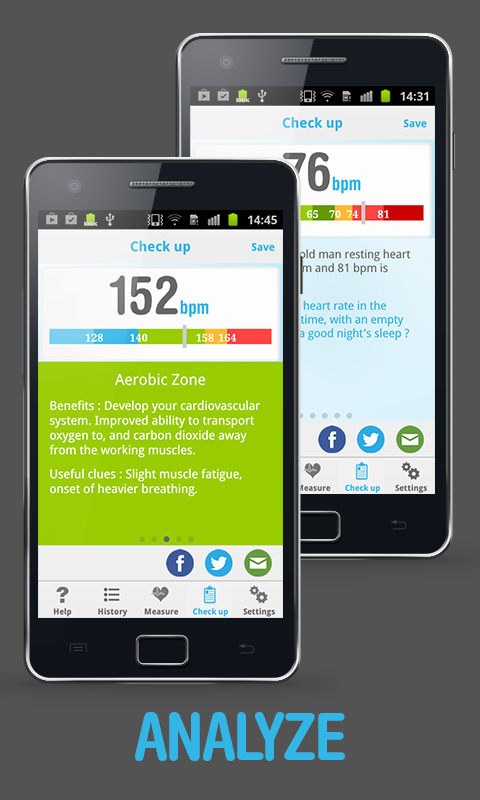
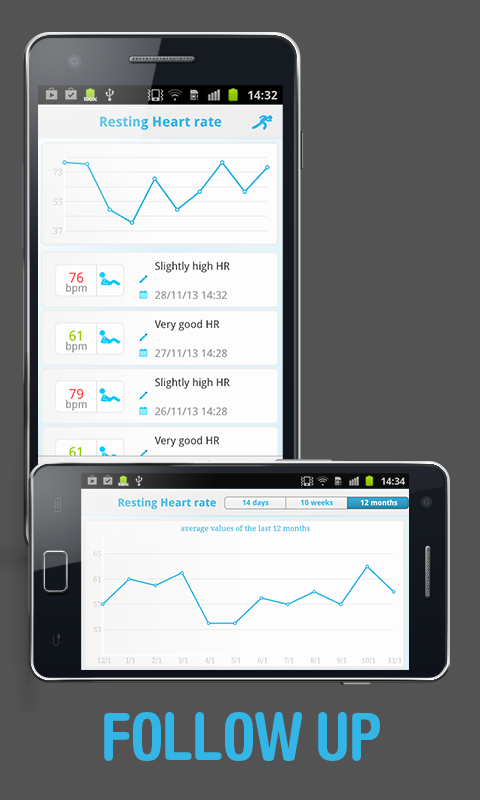
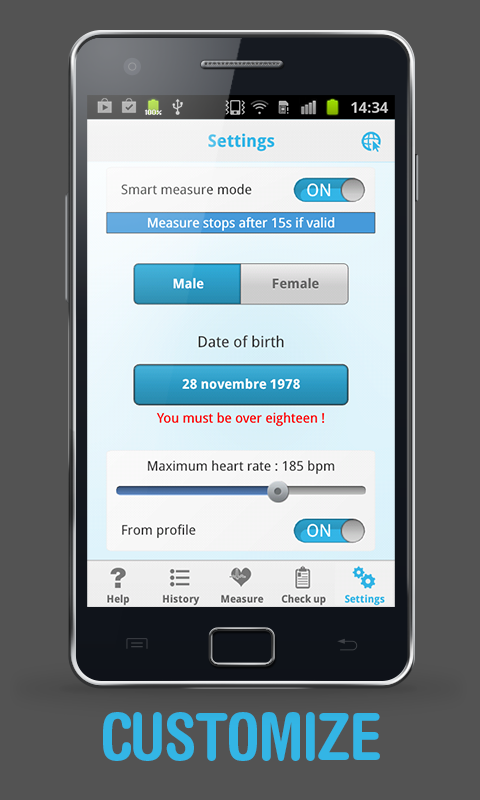
Heart Beat Rate - Pro / Instant Heart Rate - Pro ( နွလံုးခုန္နုန္း တိုင္းတာမည့္ က်န္းမာေရး APPS )

FFSPG


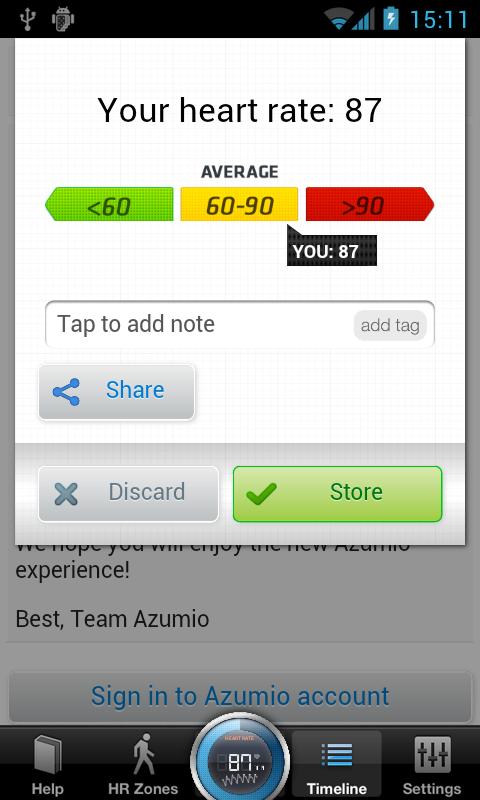
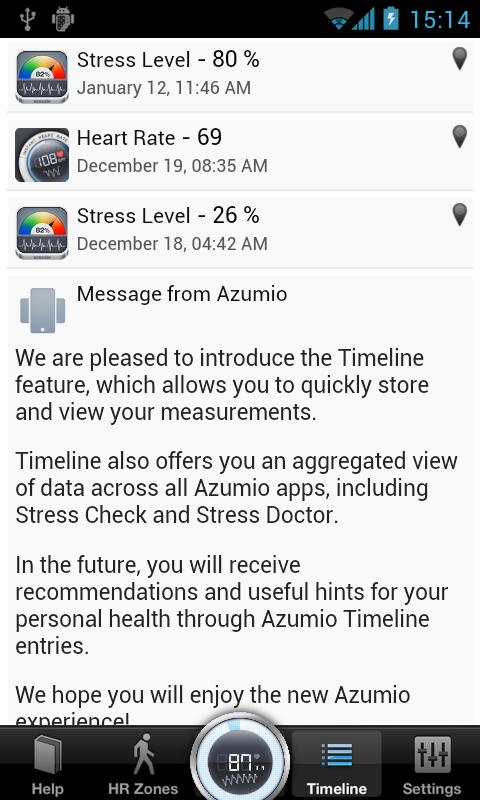
မိမိရဲ့ ဖုန္းမွာ မရွိမျဖစ္ အသံုးဝင္ လိုအပ္ APP ေလးတစ္ခုပါ ။ S5 မွာဆို system app ပါဝင္လာျပီျဖစ္ပါတယ္ ။
ေလ့က်င့္ခန္း လုပ္ျပီး မိမိေသြးခုန္နုန္း အလြယ္တိုင္းတာနိုင္သလို ၊ သာမန္အခ်ိန္ေတြမွာလည္း တိုင္းတာ
ၾကည့္ရွဳ  မွတ္ထားနိုင္ပါတယ္ ။ က်န္းမာေရး အတြက္ အေထာက္ကူေပးမယ့္ APP ေကာင္းေလးတစ္ခုျဖစ္
ပါတယ္ ။

Heart Beat Rate - Pro  & Instant Heart Rate - Pro နွစ္မ်ိဳ းတ္ေပးလိုက္ပါတယ္ ။
ၾကိဳက္နွစ္သက္ရာကို အသံုးျပဳနိုင္ပါတယ္ ခင္ဗ်ာ :)


Cover art


The Heart Beat Rate app uses your smartphone camera as a heart rate monitor.
Thanks to an innovative image analysis process which tracks your blood flow in real-time, it gives a direct and reliable measurement of your heart rate.
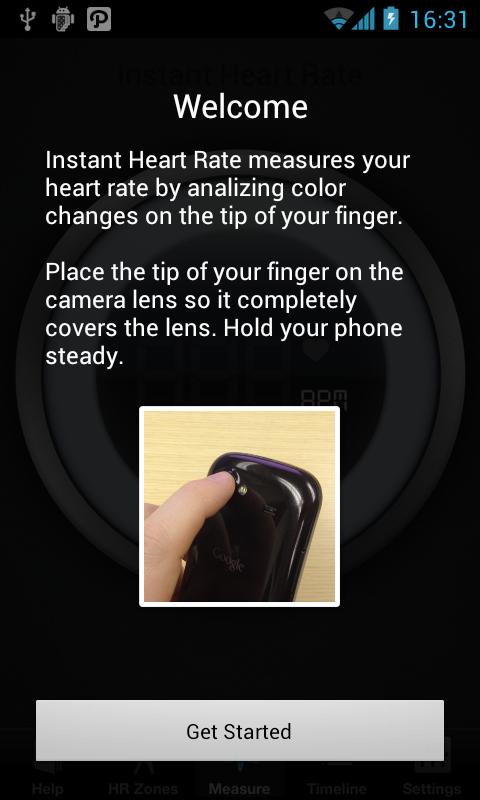
All you have to do is cover the whole camera lens with your index tip, and the application will compute your heart rate in real-time while displaying the pulse signal in a graph.


Heart Beat Rate Pro features :
● Real-time heart rate calculation & display
● Real-time pulse signal display in scrolling graphe
● Smart measure mode (measure stops after 15s if a valid pulse value is found)
● Resting heart rate checked against standards at the end of each measure
● Heart Rate training zones during physical activity
● Personnal advice to help you lower your resting heart rate for a better health
● Save measure with optional comment
● History view with a list and graph display
● Settings page
● Great design for a great user experience !

Heart Beat Rate - Pro - screenshot Heart Beat Rate - Pro - screenshot

Heart Beat Rate - Pro - screenshot Heart Beat Rate - Pro - screenshot

What's New
- fix issue causing app crash at launch on some devices

Playstore ; https://play.google.com/store/apps/details?id=air.com.bio2imaging.HeartBeatRatePro&hl=en

Updated
Size
15M
Current Version
1.4.1
Requires Android
2.2 and up


DOWNLOAD LINK;

COPY  OR  PCLOUD


Install apk,
ENJOY!

----------------------------------------------------------------------


Cover art


★ The best Health & Fitness app on Mobile Premier Awards 2011 according to jury of industry experts ★
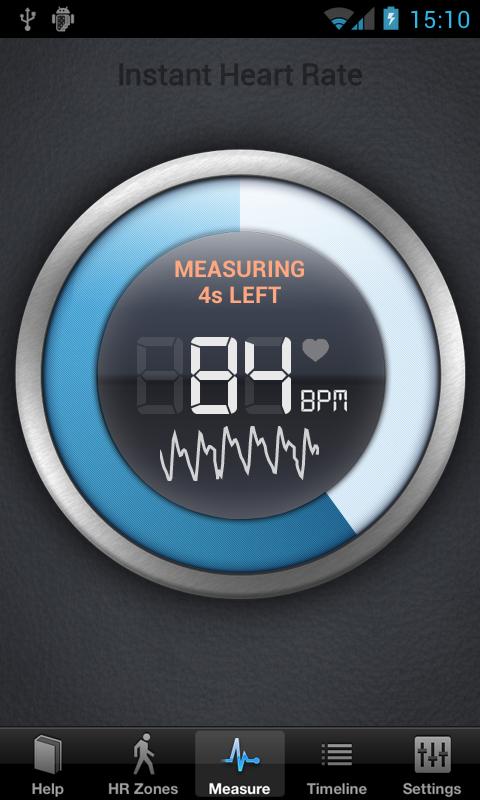
Instant Heart Rate is the most accurate Heart Rate Monitor app for any smartphone and it does not need any external hardware.
Use it for optimizing your exercise and to track your progress.
Install it now and keep fit.
Accuracy is constantly tested by fitness coaches, nurses, doctors, EMTs and 5 million users like you.


★★★★★ by Ducky
I love this app! Its really neat caus im trying to get healthy-er. Five stars
★★★★★ by Summer
I was skeptical- being a nurse I thought yah right! So I tried it at work with a monitor. It worked! Very very happy!
Place the tip of your index finger on phone’s camera and in a couple of seconds your Heart Rate will be shown.
A real-time chart will show your every heart beat.
It uses your phones built-in camera to track color changes on the fingertip that are directly linked to your pulse. This is the same technique that medical pulse oximeters use.

Instant Heart Rate - Pro - screenshot Instant Heart Rate - Pro - screenshot

Instant Heart Rate - Pro - screenshot Instant Heart Rate - Pro - screenshot

What's New
The recent update 2.5.8 brought some changes to better support some of the newer device. Unfortunately this caused problems for some of the existing users.
2.5.12 Should fix this issues. Let us know at support@azumio.com if you are still having problems.

Playstore ; https://play.google.com/store/apps/details?id=com.azumio.instantheartrate.full&hl=en

Updated
Size
4.3M
Current Version
2.5.12
Requires Android
2.3 and up


DOWNLOAD LINK;

COPY  OR  PCLOUD


Install apk,
ENJOY!


THANK FOR ALL
YM7


Wednesday, 21 May 2014

PlayerPro Music Player v2.89 Apk


FFSPG

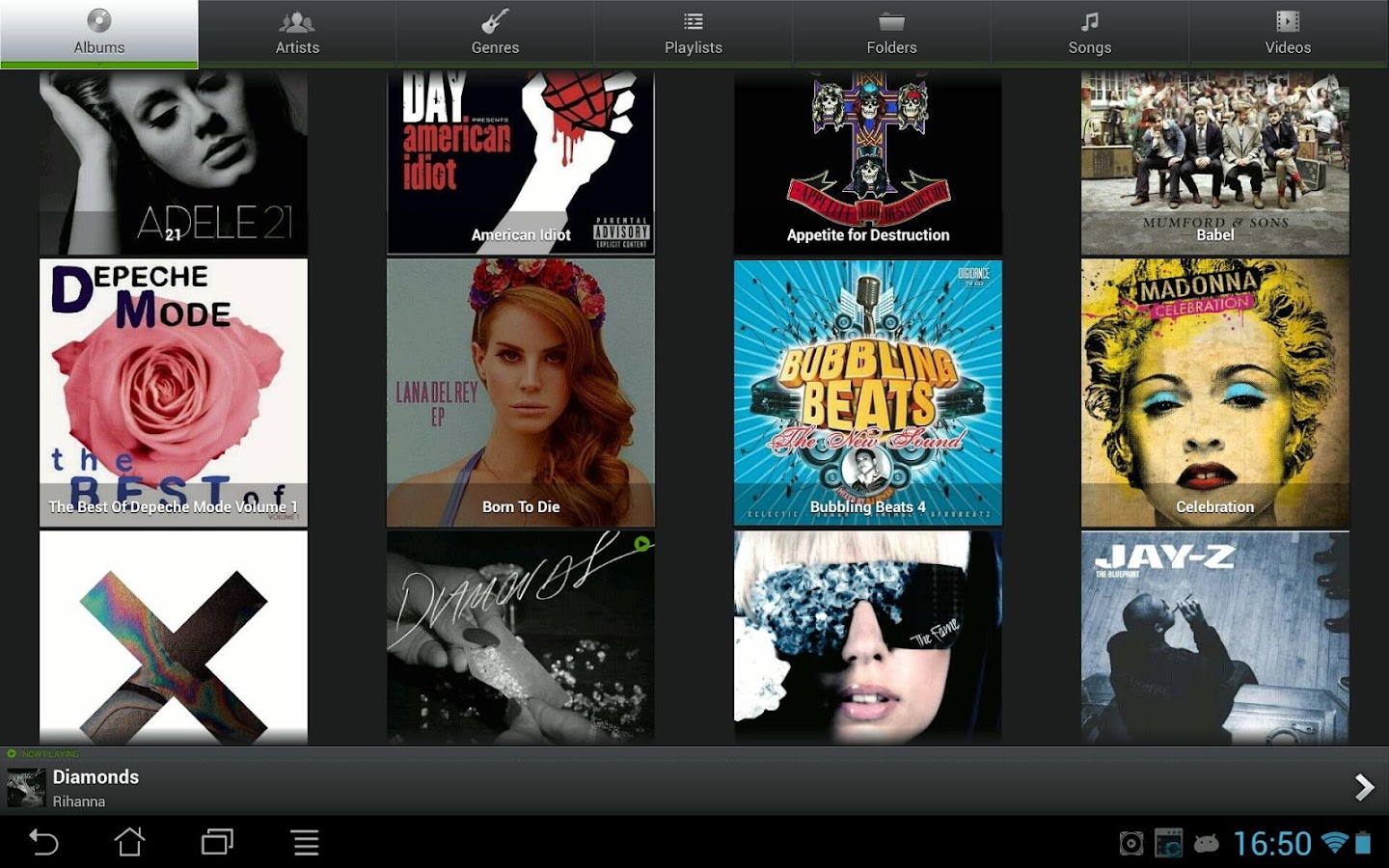
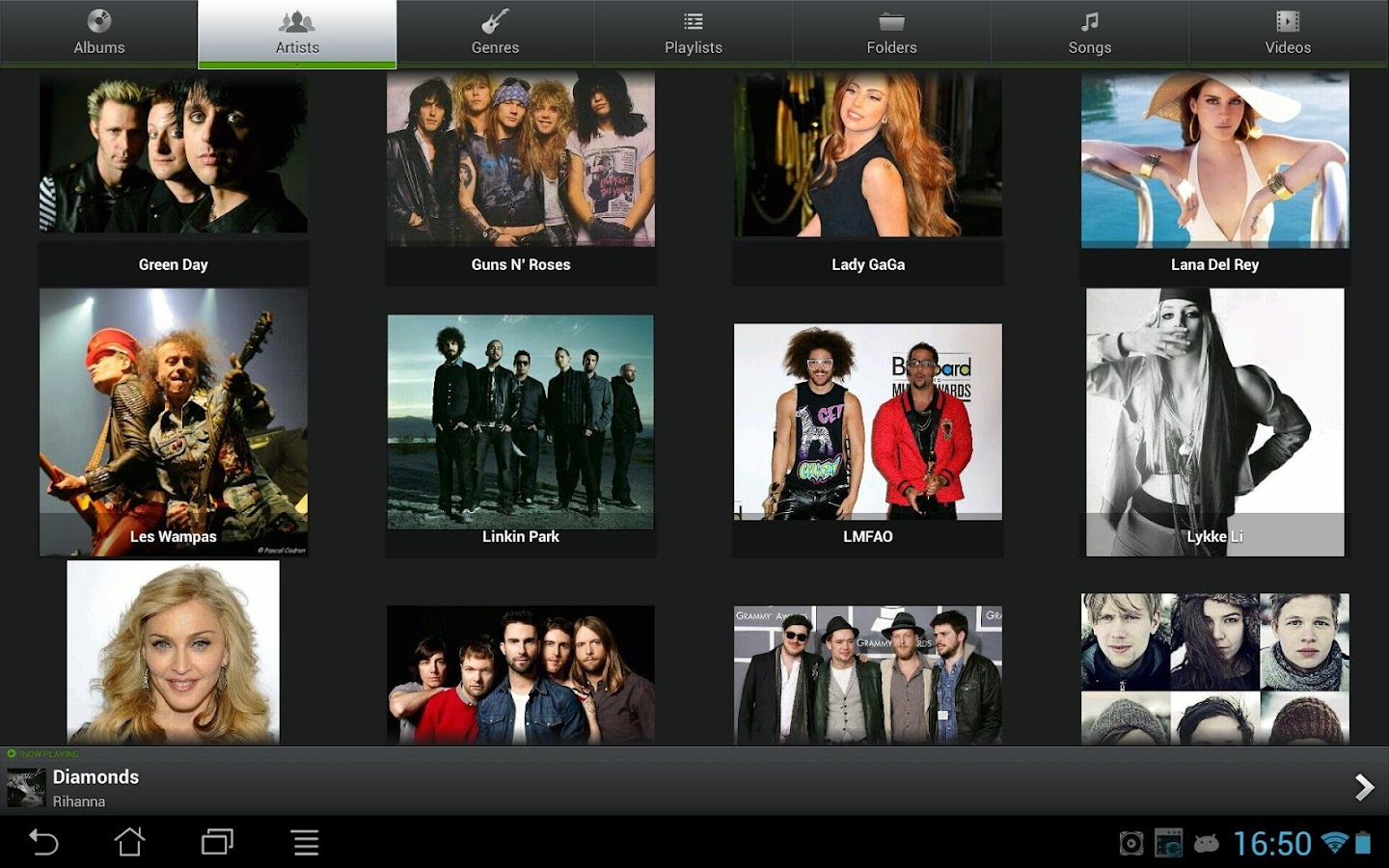
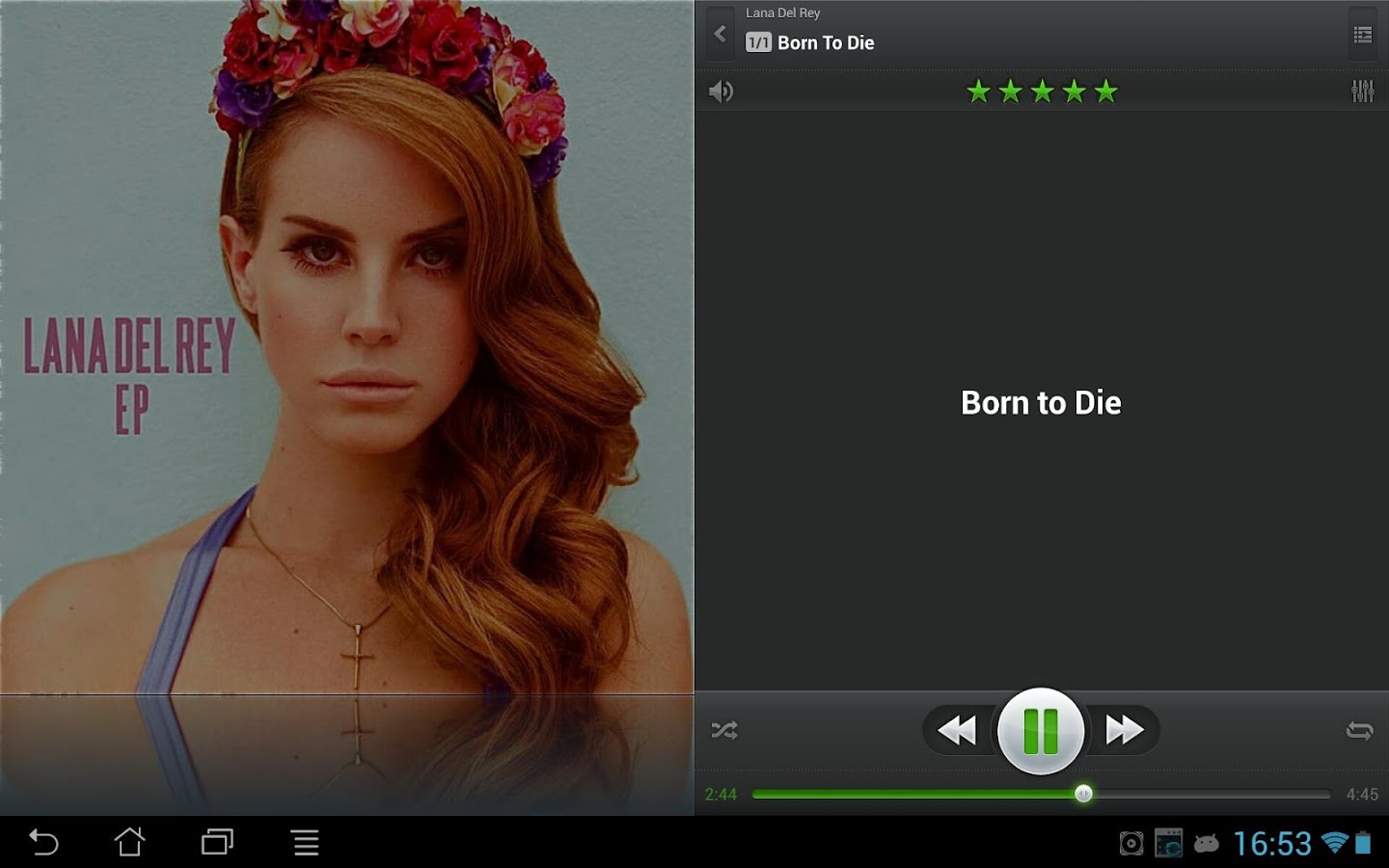
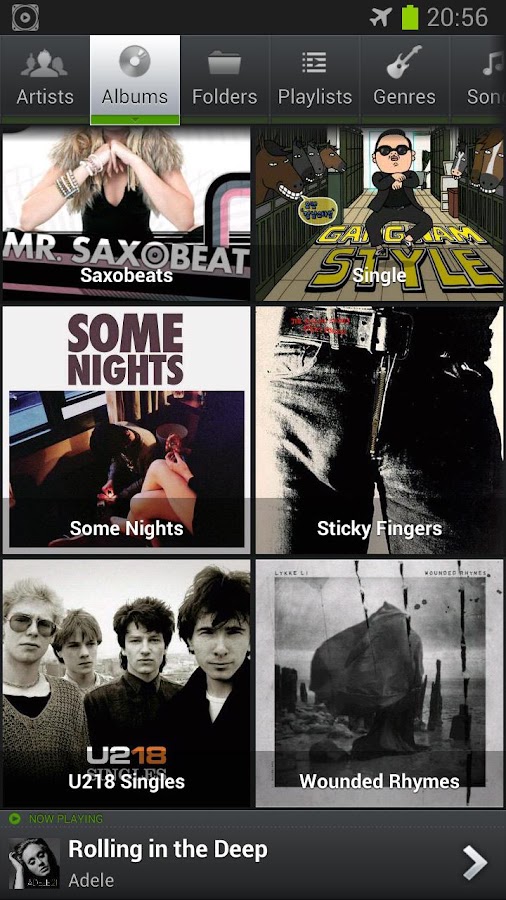
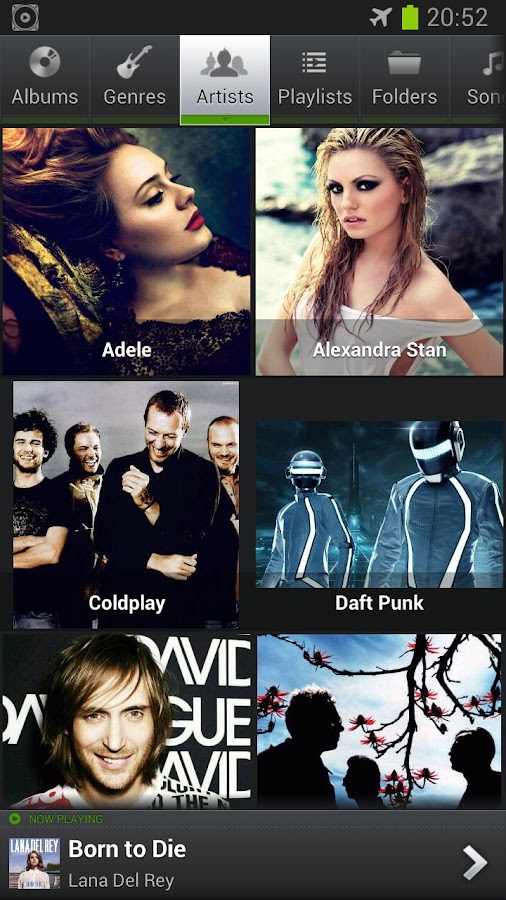
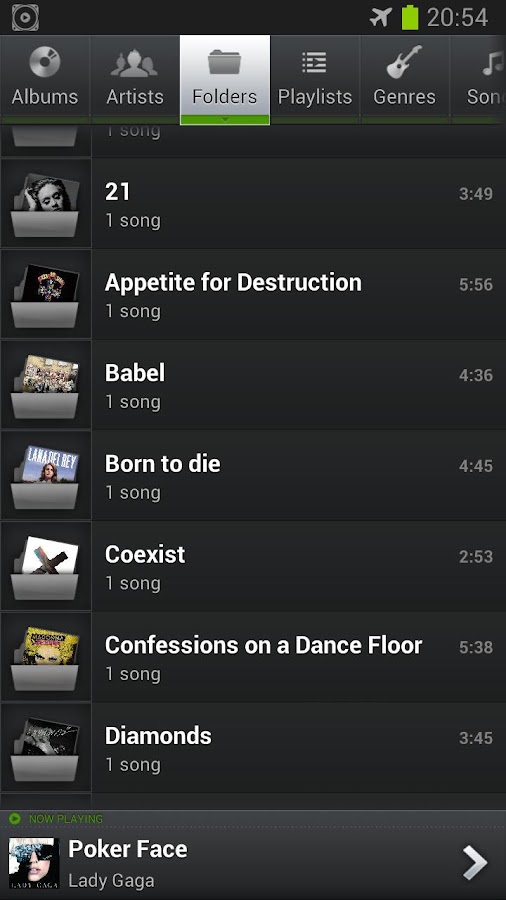
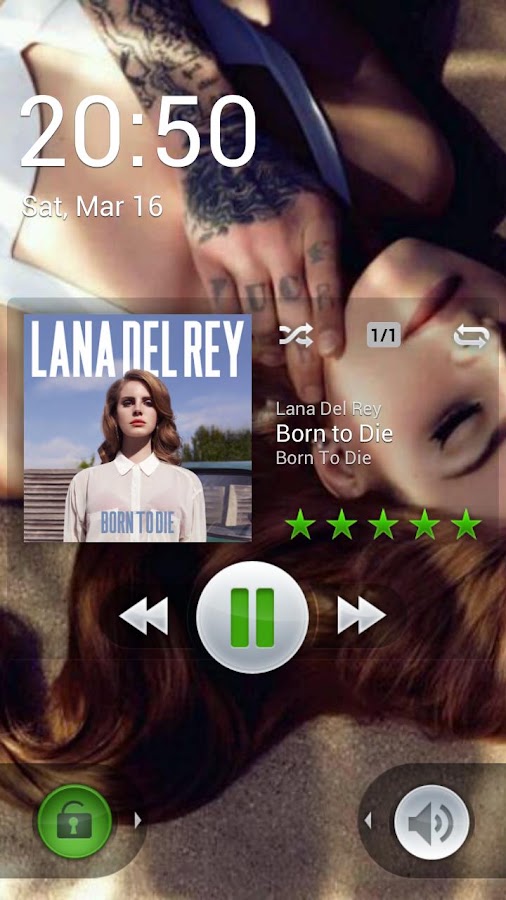
Music and Video player ေကာင္းေကာင္းေလးတစ္ခုပါပဲ ။ လူၾကိဳက္မ်ားလွပါတယ္ ။
mp3 သီခ်င္းမ်ားကို ဖြင့္ျပီး edit မွေန သီခ်င္း lyric စာသားမ်ား ေရးျပီး သိမ္းထားနိုင္သလို ။
view lyric မွျပန္ၾကည့္နိုင္ပါတယ္ ။ အျခား future ေတြကေတာ့ ကိုယ္တိုင္ခံစားေတာ့ဗ်ာ :)

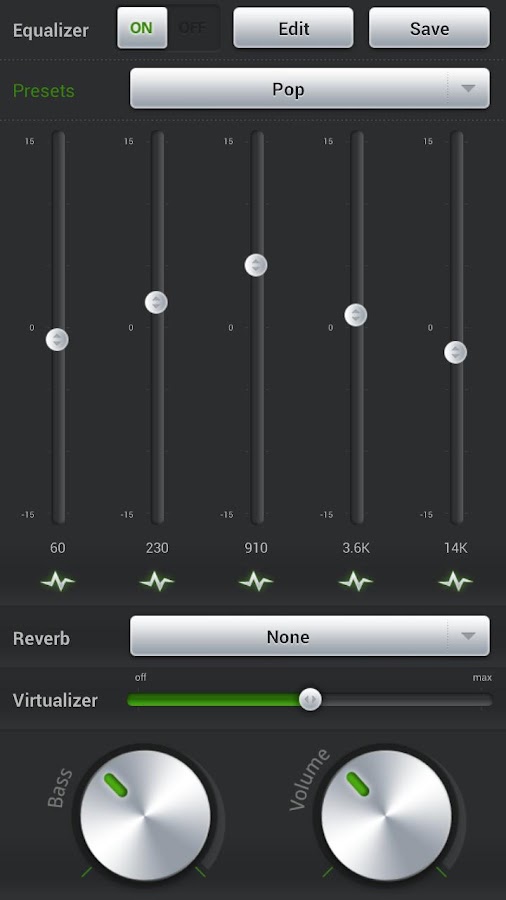
This application is an advanced music and video player for Android 2.x devices.
PlayerPro features a beautiful, fast and intuitive interface, alongside powerful audio configuration options. In addition, there is a choice of several FREE plugins to complement it: 20+ skins, DSP Pack, Widget Pack ...
PlayerPro has been in the top five android apps in the music & audio category for over two years and is actively being developed and supported.
Note: the Pro version is standalone. Please uninstall the trial version after purchase.

Cover art

PLAY STORE LINK; https://play.google.com/store/apps/details?id=com.tbig.playerpro

What's New
15/05:
- Performance improvements
- Bug fixes
- Updated translations
25/04:
- Ability to edit (resize, crop, rotate etc) album artwork, artist pictures and genre illustrations
- New xHD versions for Cloudy Copper/Pink skins
- New Social Network and Flatty skins released
- Fixed a bug causing the wrong artwork dimensions to be displayed when searching for album/artist/genre artwork on internet
- Fixed a bug causing the update of album/artist/genre artwork to fail when selected from the gallery
 
 
Updated
Size
5.3M
Current Version
2.89
Requires Android
2.0 and up

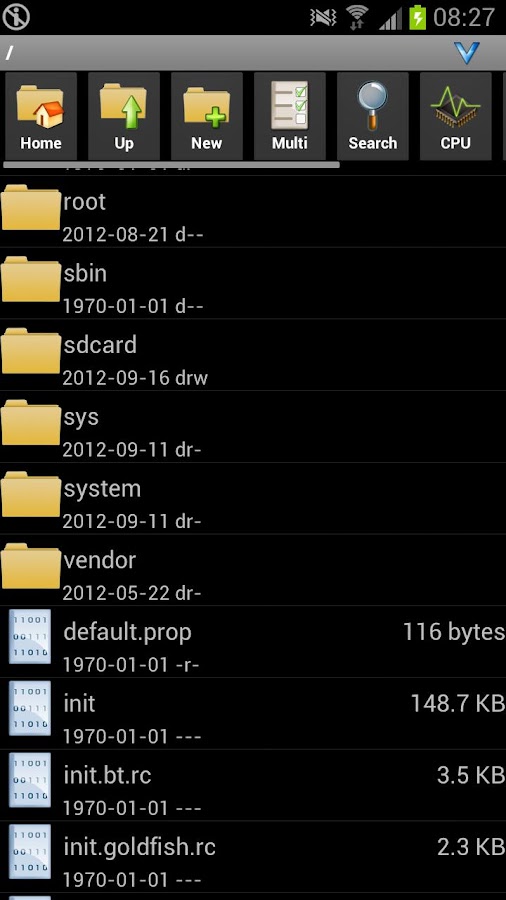
PlayerPro Music Player - screenshot

PlayerPro Music Player - screenshot

PlayerPro Music Player - screenshot

PlayerPro Music Player - screenshot

PlayerPro Music Player - screenshot PlayerPro Music Player - screenshot

PlayerPro Music Player - screenshot PlayerPro Music Player - screenshot

PlayerPro Music Player - screenshot PlayerPro Music Player - screenshot


DOWNLOAD LINKSS;


DROPBOX  OR  PCLOUD


INSTALL APK,
ENJOY!


THANK FOR ALL
YM7


AndroZip™ Pro File Manager v4.7.1 Apk


Cover art
FFSPG


ဖုန္းကေန zip,rar ဖိုင္ေျဖဖို ့ ခ်ဳပ္ဖို ့ AndroZip™ Pro File Manager ေလးပါ။
ဖုန္းမွာ မရွိမျဖစ္ အသံုးဝင္မယ့္ေကာင္ေလးျဖစ္ပါတယ္ ။

#1 ZIP application and first Android archiver is with you since beginning of 2009. AndroZip™ File Manager helps you copy, delete, move, unzip/unpack, compress, encrypted ZIP supported, search, and organize your files, music, pictures, and folders just like you would do on your PC. Frequently updated with new and useful features.
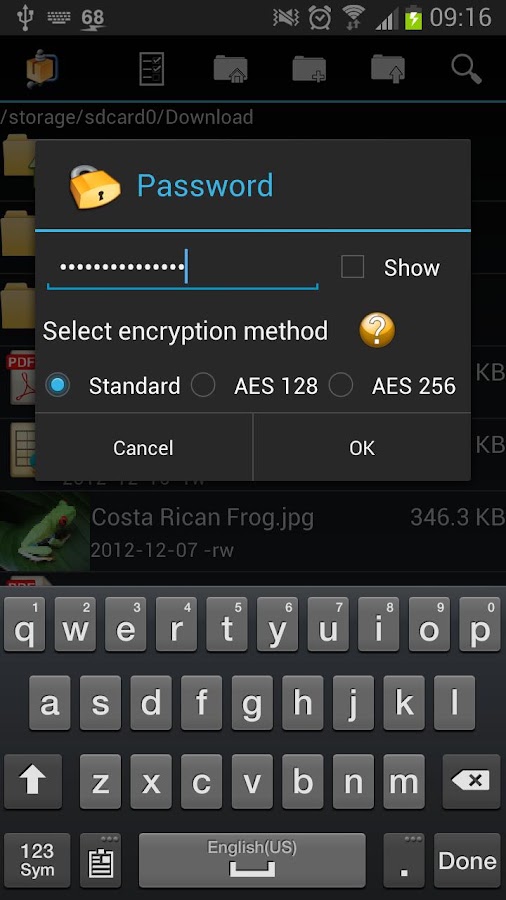
Upload your files, photos, videos to your Dropbox account and manage your Dropbox files. You can also protect/encrypt your files with AndroZip™ as encrypted ZIP files.

********************************
What others say about AndroZip™
"AndroZip comes to the rescue, providing a file explorer, task manager, archive manager, app backup tool, and more, all within a simple and intuitive interface." (PCWorld, MacWorld and Washington Post had same review)
“Of all the file managers I have tried for the Android platform, the one that stands heads above the rest is the free AndroZip File Manager...“(Jack Wallen, TechRepublic)
“Just like winzip or winrar” (Eric, AndroZip user)
***************************
Work with archives: ZIP, RAR, GZIP, TAR, BZIP2
Create ZIP,TAR,GZIP
File manager (single/multiple)
Task killer, Search, application manager
Install apps: APK files
Short tap and long tap menus
Send files via mail
New features in the upcoming version!

What's New
* Bug fixes around KitKat (Android 4.0 and up) compatibility
* Added an Antivirus and Anti-malware scanner

PLAY STORE LINK; https://play.google.com/store/apps/details?id=com.asrazpaid

Updated
Size
2.2M
Current Version
4.7.1
Requires Android
2.2 and up


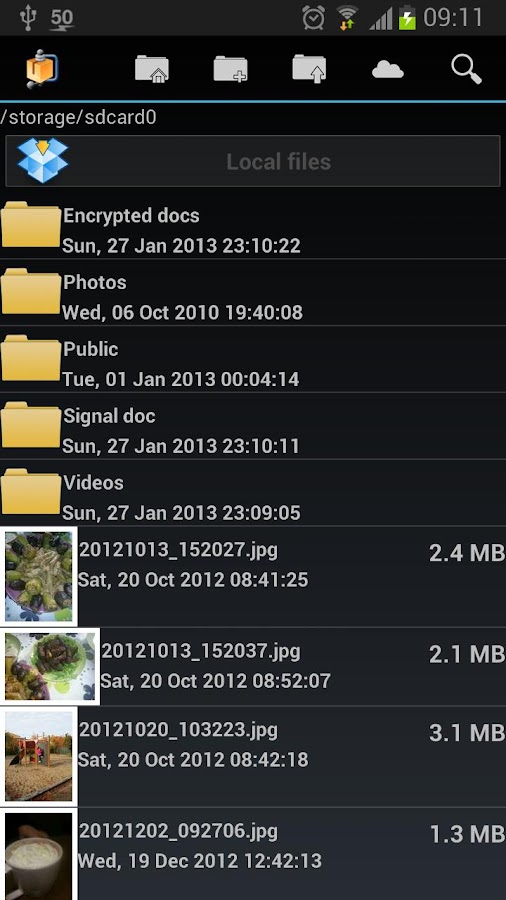
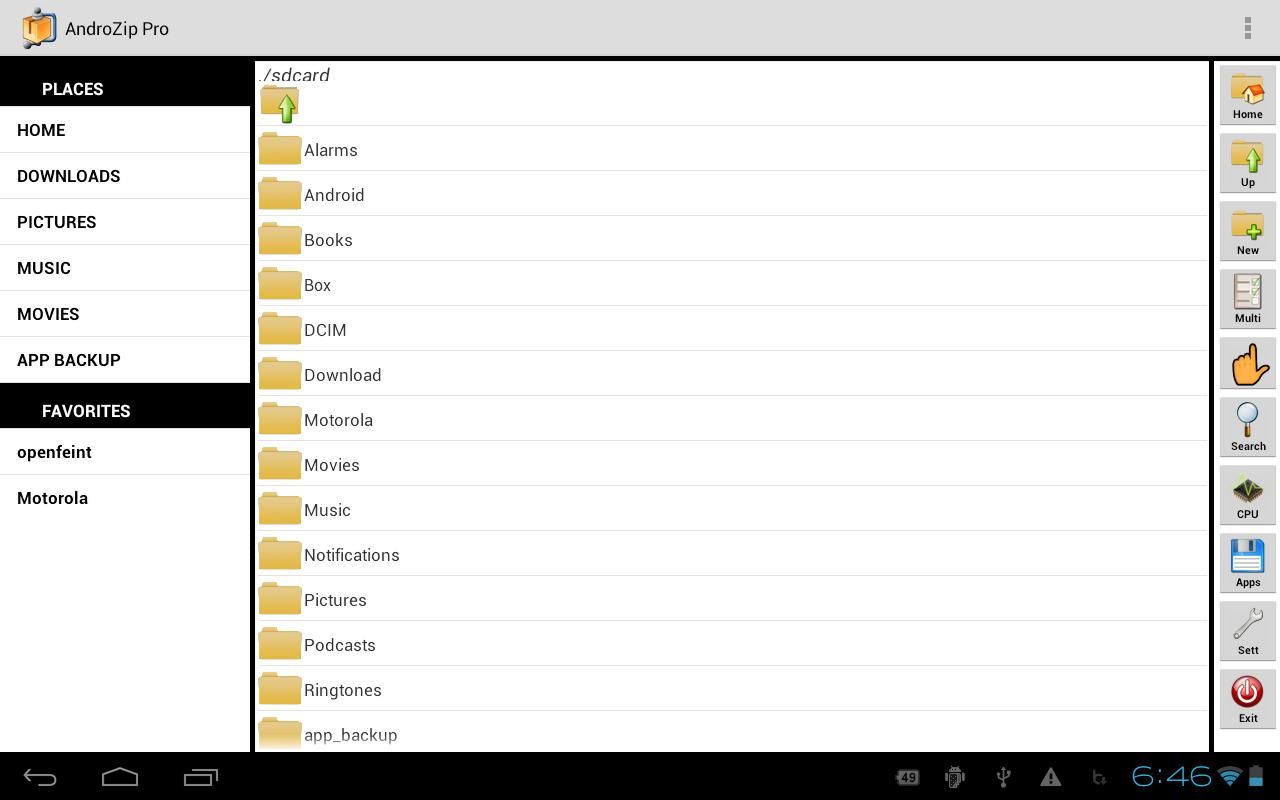
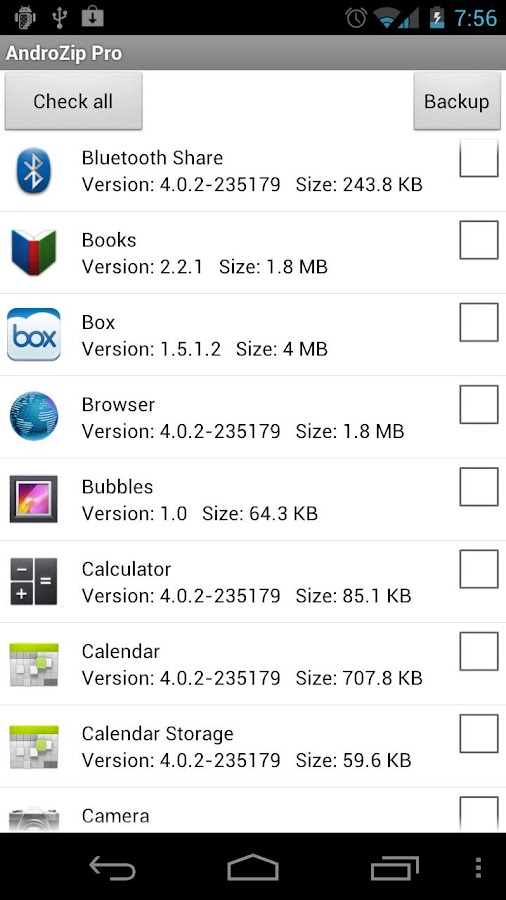
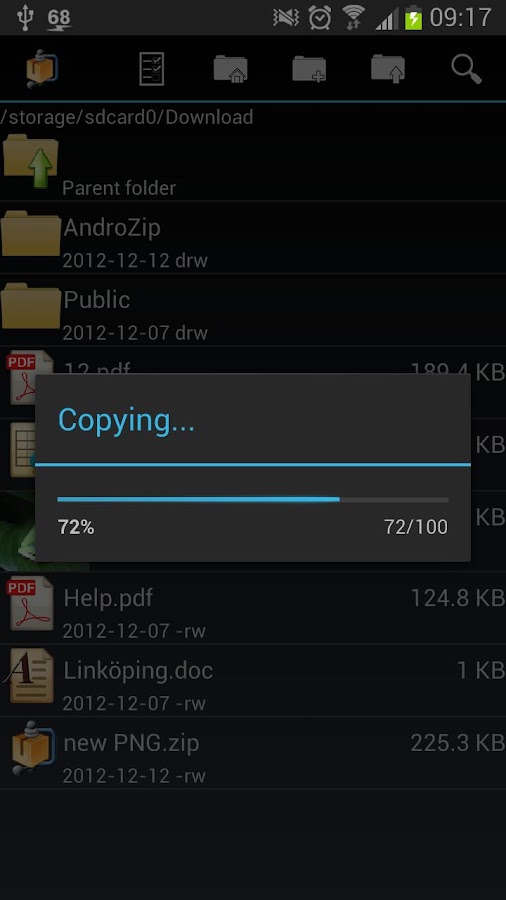
AndroZip™  Pro File Manager - screenshot AndroZip™  Pro File Manager - screenshot

AndroZip™  Pro File Manager - screenshot

AndroZip™  Pro File Manager - screenshot AndroZip™  Pro File Manager - screenshot

AndroZip™  Pro File Manager - screenshot


DOWNLOAD LINKS;


DROPBOX  OR  PCLOUD


INSTALL APK,
ENJOY!


THANK FOR ALL
YM7